General concepts
Motions
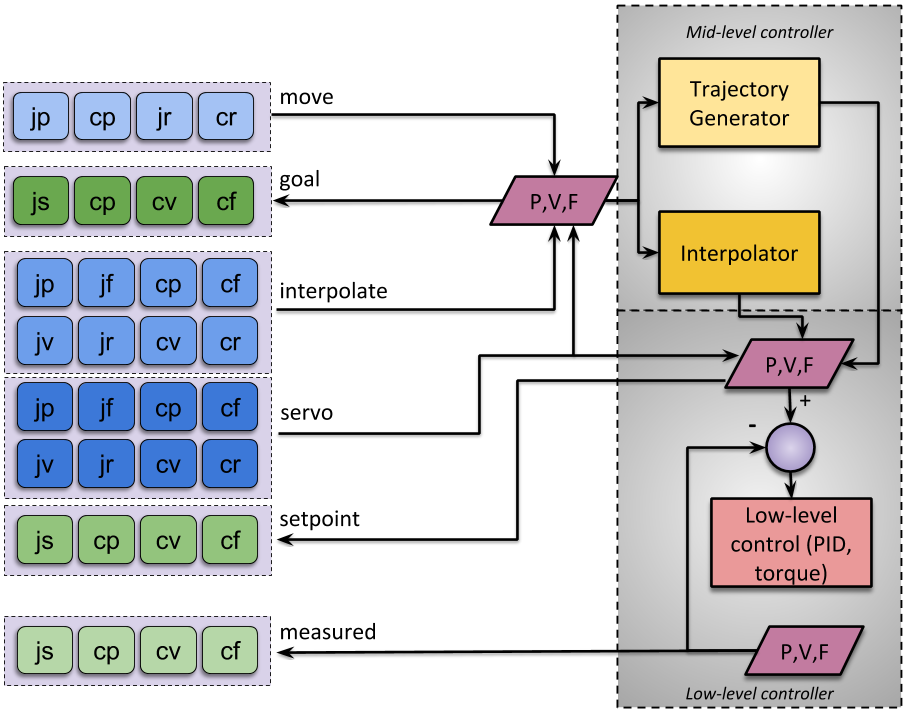
We identified the following basic types of motions for collaborative robotics. All these commands can be defined either in the cartesian or joint space.
servo
Direct access to the low-level controller:
Use cases:
User has a smooth and continuous trajectory coming from a leader arm or recorded trajectory and can send commands at a high rate.
Closing the loop in velocity mode using a fast external sensor with a task based Jacobian.
Haptic feedback on leader arm.
Type: These commands can be either position, velocity or effort based. Positions can be provided relative from the latest setpoint position.
Continuity: Users should send continuous commands. The low-level controller is not required to generate intermediate setpoints to ensure that the command is feasible (i.e., setpoint should be close to current state). The low-level controller can enforce limits, e.g., reject a command if the difference from the previous command is greater than a defined threshold.
Time: Users are expected to send commands periodically at a rate close to the low-level rate. These commands are preemptive.
interpolate
Simple interpolation:
Use cases:
User has a smooth trajectory coming from a leader arm or recorded trajectory, but cannot send commands at a high rate (e.g., 50Hz visual tracking, remote tele-operation).
In general, similar usage as
servobut the application can not send commands fast enough to provide a smooth command so the low-level controller needs to interpolate the user commands (smooths but adds latency).
Type: These commands can be either position, velocity or effort based. Positions can be provided relative from the latest setpoint position.
Continuity: Users must send continuous commands. The low-level controller will compute intermediary positions to smooth the motion.
Time: Users are expected to send commands periodically at a rate lower than the low-level controller. The velocity of the motion is defined by the user commands. These commands are preemptive.
move
Move with trajectory generation:
Use case: User wants to move to a given position and stop there (e.g., home position, pick and place)
Type: These commands are position based, either absolute or relative.
Continuity: Users must send feasible commands. The low-level controller will compute a complete trajectory to move from the current state (position and velocity) to the desired goal (position).
Time: Users are expected to send a single command and wait for completion before sending a new one. Time of execution is defined by the trajectory generation parameters (acceleration and velocity).
Naming convention
Command names are based on the space, type and control level. The
prefix identifies the control level (servo, interpolate or
move), it is followed by an underscore (_) and two letters
identifying the space and type. For example, servo_cp is a “servo”
command with a cartesian (c) position (p) setpoint.
Query commands
Space:
j(joint),c(cartesian)Type:
Joint:
s(state: position, velocity and effort)Cartesian:
p(pose),v(twist),f(wrench)
Level:
Measured:
measured(physical measure from sensors)Low-level:
setpoint(current servo setpoint)Mid-level:
goal(current interpolate or move goal)
Motion commands
Space:
j(joint),c(cartesian)Type:
p(position or pose),r(relative position or pose),v(velocity or twist),f(force, wrench or effort)Control level:
servo(low-level),interpolate(basic interpolation),move(full trajectory planning)
Data validity
For all query commands, it might be necessary to indicate that the data is not valid. For all invalid data, the header timestamp should be set to 0 (recall that the timestamp represents an absolute time since January 1, 1970).
ROS Specific: The header timestamp is the field time
Header.stamp. Since it is not necessary to keep publishing
invalid data, it is recommended to not publish on the corresponding
topic until the data becomes valid again. To allow new a ROS node to
detect invalid data, the ROS topic should be latched. See ROS
publisher options.
Overview
Table
Syntax |
|
|---|---|
Control level |
|
Feedback |
|
Space |
|
Type |
|
Diagram
Namespaces
Since the CRTK API is fairly simple and the payloads don’t necessarily contain a string to specify which part of robot is used (for both query and motion commands), namespaces can be used to define which part of the robot is addressed. For example, a robot manipulator will often be composed of a kinematic chain for cartesian control and a gripper at its tip. The gripper can usually be driven only in joint space. Let’s assume a Universal Robot (6 DOFs) with a gripper. On ROS, this robot can be represented using the following topics:
/UR/namespace for the serial links with joints and cartesian commands/UR/measured_js, joint state for the first 6 joints/UR/measured_cp/UR/setpoint_js/UR/setpoint_cp/UR/servo_jp…
/UR/grippernamespace for the gripper, only joint commands./UR/gripper/measured_js, joint state for the single joint controlling the gripper/UR/gripper/setpoint_js/UR/gripper/servo_js, servo command to control the gripper’s opening using one joint
Namespaces can also be used to organize different topics:
Providing the forward kinematic with respect to a different reference frame. For the dVRK,
/PSM1/measured_cpis defined with respect to the camera coordinate system. If a user needs access to the cartesian position with respect to the local coordinate system of the PSM, i.e. it’s RCM (remote center of motion), they can use the topic/PSM1/local/measured_cp.Providing information for redundant sensors. The da Vinci arms used with the dVRK have redundant sensors on all joints. To access the state of the default sensors (encoders), the ROS topic is
/PSM1/measured_js. To access the potentiometers state, the topic is/PSM1/actuators/measured_js.A namespace can also be used to define a new behavior. By default
servo_cfwould be used to control the amount of force applied by the robot on its environment (for example with an haptic device). For a device with a handle mounted on a force sensor, the compliant control can be exposed using something like/galen/compliance/servo_cf. Sending a zero wrench would activate the force compliant mode where the robot is trying to maintain a zero force on the handle by following the forces applied by the user.
Namespaces can also be used besides ROS. For example in Python or C++, one can create a struct or class to group some methods:
my_ur = ur('/UR')
js_robot = my_ur.measured_js()
js_gripper = my_ur.gripper.measured_js()
Pending issues, limitations
The following issues appeared as we implemented different robots using CRTK, mostly on the dVRK.
In the current implementation,
servo_jpuses a ROS message typeJointStatethat contains 3 vectors, position, velocity and effort. The position is required but velocity and effort and ignored. If the user can provide a velocity, this could potentially be used by the low-level controller (e.g. PID) to provide a better trajectory following. The effort vector could be used as a bias force for the PID controller for such things as gravity compensation or haptic feedback. To note, it would be hard to port this behaviorservo_cpsince the ROS payload currently used doesn’t provide a placehold for the velocity nor effort.In the current specification and implementation,
movecommands use existing ROS message types. As such there is no way to specify the desired velocity at the goal point. Current implementation assumes the goal velocity is zero.Many commands, both query and motion ones, assume a reference frame. For example, a
servo_cfcommand can be defined with respect to the base frame (aka space) or end effector (aka body). Instead of using the ROSframe_idto define the reference frame, we used namespaces to define the reference frame, i.e. we define bothspatial/servo_cfandbody/servo_cf. The same can be applied for measured twist and wrench (measured_cvandmeasured_cf).For relative cartesian command, the specifications don’t specify if the relative transformation is defined with respect to the end effector or the base frame of the robot. These commands have not been implemented on the dVRK.
Other notes
For temporarily unavailable data, set the time header.stamp
to 0. For commands not supported at all by the robot, make sure
the topic is not available.
For all commands (aka topics) using dynamic vectors (e.g
sensor_msgs/JointState), all the non-empty dynamic vectors must
have the same size and the size must match the number of joints on the
robot used. If a subset of the information is not available, the
corresponding vector (name, position, velocity or effort) should be
empty, i.e. of size 0.
When using ROS, all query commands related to the robot telemetry should be implemented as publishers on the robot side.
Query commands
measured_js
Measured joint state.
Payload:
sensor_msgs/JointStateSpecification: *
time header.stamp: time of measurement [required]string header.frame_id: reference frame (this should match theheader.frame_idstring inmeasured_cp) [required]string name[]: array of joint names [required]float64 position[]: array of measured joint positions [optional]float64 velocity[]: array of measured joint velocities [optional]float64 effort[]: array of measured joint efforts [optional]
Notes:
velocity should be provided if the low-level controller has the ability to perform velocity estimation
effort should be provided if the low-level controller has torque sensors or current feedback per joints
measured_cp
Measured cartesian position.
Payload:
geometry_msgs/PoseStamped(before 01/2022 payload wasgeometry_msgs/TransformStamped, see issue #1)Specification:
time header.stamp: time of measurement, if the measured cartesian position is based on a measured joint position, the time stamp should be the same asmeasured_js[required]string header.frame_id: reference frame [required]string frame_id: moving frame [not available on ROS]Transform transform: translation and rotation for the measured cartesian position (e.g. forward kinematics based on measured joint position from measured_js) [required]
measured_cv
Measured cartesian velocity (twist).
Payload:
geometry_msgs/TwistStampedSpecification:
time header.stamp: time of measurement, if the measured twist is based on a measured joint velocity, the time stamp should be the same asmeasured_js[required]string header.frame_id: reference frame, see measured_cp [required]string frame_id: moving frame, see measured_cp [not available on ROS]Twist twist: linear and angular components for the measured cartesian velocity (e.g. Jacobian applied to measured joint velocities) [required]
Notes:
This command will not be available if the low-level controller doesn’t have a way to estimate joint velocity.
measured_cf
Measured cartesian force (wrench).
Payload:
geometry_msgs/WrenchStampedSpecification:
time header.stamp: time of measurement, if the measured wrench is based on a measured joint efforts, the time stamp should be the same as measured_js [required]string header.frame_id: reference frame, see measured_cp [required]string frame_id: moving frame, see measured_cp [not available on ROS]Wrench wrench: force and torque components for the measured cartesian wrench (e.g. Jacobian applied to measured joint efforts) [required]
Notes:
This command will not be available if the low-level controller doesn’t have a way to estimate joint efforts.
setpoint_js
Joint setpoint (low-level controller).
Payload: sensor_msgs/JointState
Specification:
time Header.stamp: time associated to last servo command. This can be defined by a direct servo command or an intermediary set point calculated by interpolate or move.string header.frame_id: reference frame, see measured_js [required]string name[]: array of joint names [required]float64 position[]: array of setpoint joint positions [see notes]float64 velocity[]: array of setpoint joint velocities [see notes]float64 effort[]: array of setpoint joint efforts [see notes]
Notes:
At least one of the 3 vectors (position, velocity and effort) should be used.
Generally, this message should return at least the setpoint corresponding to the last motion command (for example, a
positionsetpoint if the last motion specified a position). Depending on the type of low-level controller, other quantities could be included, as in the following examples:If the controller hardware implements motor current (torque or effort) control, the low-level controller will convert a specified
positionorvelocitysetpoint to aneffortsetpoint,F_llc. In this case, the effort setpoint can also be included.If the controller hardware implements position control, the low-level controller will integrate a
velocitysetpoint to become apositionsetpoint. In this case, both thepositionandvelocitysetpoint could be included.
When using the commands
interpolateormove,positionandvelocityat timetshould be computed by the interpolator or the trajectory generator (p(t)andv(t)).If the command is defined in cartesian space, the corresponding joint space value should be provided (inverse kinematics for
position, use Jacobian forvelocityandeffort).Summary:
command level
``position``
``velocity``
``effort``
servo_{j,c}psetpointn/a
F_llcor n/aservo_{j,c}vn/a
setpoint
F_llcor n/aservo_{j,c}fn/a
n/a
setpoint
interpolate_{j,c}pp(t)V_llcorv(t)F_llcor n/ainterpolate_{j,c}vn/a
V_llcorv(t)F_llcor n/ainterpolate_{j,c}fn/a
n/a
f(t)move_{j,c}pp(t)V_llcorv(t)F_llcor n/a
setpoint_cp
Cartesian position setpoint (low-level controller).
Payload:
geometry_msgs/PoseStamped(before 01/2022 payload wasgeometry_msgs/TransformStamped, see issue #1)Specification:
time header.stamp: seesetpoint_js[required]string header.frame_id: reference frame [required]string frame_id: moving frame [required]Transform transform: translation and rotation for the commanded cartesian position (e.g. forward kinematics based on joint positions fromsetpoint_js) [required]
Notes:
This query is valid only if the
positionfield insetpoint_jsis valid, i.e. when the motion commands are position based, i.e.{servo,interpolate,move}_{j,c}p. For all other motion commands, the data should be marked as invalid by zeroing thetime header.stamp.
setpoint_cv
Cartesian velocity setpoint (low-level controller).
See setpoint_cp and setpoint_js.
setpoint_cf
Cartesian force setpoint (low-level controller).
See setpoint_cp and setpoint_js.
goal_js
Joint goal (mid-level controller).
This command is not fully specified yet. It should at least report
the end goal from {interpolate,move}_{c,j}{p,v,f}.
goal_cp
Cartesian position goal (mid-level controller).
See goal_js
goal_cv
Cartesian velocity goal (mid-level controller).
This command is not fullt specified yer. It should at least report
the goal from interpolate_{j,c}v
Motion commands
servo_jp
Set position joint setpoint (low-level).
Payload:
sensor_msgs/JointStateSpecification:
time Header.stamp: time associated to theservocommand [not used but recommended]string header.frame_id: reference frame, seemeasured_js[not used but recommended]string name[]: array of joint names [not used but recommended]float64 position[]: array of setpoint joint positions [required]float64 velocity[]: [not used]float64 effort[]: [not used]
Notes:
These commands are pre-emptive, the latest command received will set the position setpoint used by the low-level controller.
stamp, frame_id and name are not used by the command so they could be left empty. It is nevertheless recommended to use them for data collection or further validation.
servo_jr
Set position joint relative setpoint (low-level).
* Payload: sensor_msgs/JointState
Specification:
time Header.stamp: time associated to theservocommand [not used but recommended]string header.frame_id: reference frame, seemeasured_js[not used but recommended]string name[]: array of joint names [not used but recommended]float64 position[]: array of setpoint joint relative position [required]float64 velocity[]: [not used]float64 effort[]: [not used]
Notes: See servo_jp.
servo_jv
Set velocity joint setpoint (low-level).
Payload:
sensor_msgs/JointStateSpecification:
time Header.stamp: time associated to theservocommand [not used but recommended]string header.frame_id: reference frame, seemeasured_js[not used but recommended]string name[]: array of joint names [not used but recommended]float64 position[]: [not used]float64 velocity[]: array of setpoint joint velocities [required]float64 effort[]: [not used]
Notes: See servo_jp.
servo_jf
Set effort joint setpoint (low-level).
servo_cp
Set position cartesian setpoint (low-level)
servo_cr
Set position cartesian relative setpoint (low-level)
servo_cv
Set velocity cartesian setpoint (low-level)
servo_cf
Set effort cartesian setpoint (low-level)
interpolate_jp
Set position joint goal (with interpolation). See servo_jp.
interpolate_jr
Set position joint relative goal (with interpolation). See servo_jr.
interpolate_jv
Set velocity joint goal (with interpolation). See servo_jv.
interpolate_jf
Set effort joint goal (with interpolation). See servo_jf.
interpolate_cp
Set position cartesian goal (with interpolation). See servo_cp.
interpolate_cr
Set position cartesian relative goal (with interpolation). See servo_cr
interpolate_cv
Set velocity cartesian goal (with interpolation). See servo_cv.
interpolate_cf
Set effort cartesian goal (with interpolation). See servo_cf.
move_jp
Set position joint goal (with trajectory generation).
Payload:
sensor_msgs/JointStateSpecification:
time Header.stamp: time associated to theservocommand [not used but recommended]string header.frame_id: reference frame, seemeasured_js[not used but recommended]string name[]: array of joint names [not used but recommended]float64 position[]: array of goal joint positions [required]float64 velocity[]: [not used]float64 effort[]: [not used]
move_jr
Set position joint relative goal (with trajectory generation).
Payload:
sensor_msgs/JointStateSpecification:
time Header.stamp: time associated to theservocommand [not used but recommended]string header.frame_id: reference frame, seemeasured_js[not used but recommended]string name[]: array of joint names [not used but recommended]float64 position[]: array of goal joint relative positions [required]float64 velocity[]: [not used]float64 effort[]: [not used]
move_cp
Set position cartesian goal (with trajectory generation). See servo_cp.
move_cr
Set position cartesian relative goal (with trajectory generation). See servo_cr.